
Using TOKENOPEN API with Hermes Agent
Use Nous Research's Hermes Agent with TOKENOPEN API to build an autonomous AI assistant with persistent memory
Hermes Agent is an open-source autonomous AI Agent from Nous Research. It features persistent memory, multi-platform integration (20+ messaging platforms), and long-context processing — ideal for deploying on servers for continuous tasks. By configuring TOKENOPEN API, you can use all models available on the platform.
Hermes Agent requires a model with a 64K+ token context window. Choose a long-context model such as gpt-5.5 or claude-sonnet-4-6.
Step 1: Install Hermes Agent
Use the official install script:
curl -fsSL https://raw.githubusercontent.com/NousResearch/hermes-agent/main/scripts/install.sh | bashAfter installation, run the post-install step:
hermes postinstallRun in PowerShell:
iex (irm https://raw.githubusercontent.com/NousResearch/hermes-agent/main/scripts/install.ps1)After installation, run the post-install step:
hermes postinstallInstall via pip:
pip install hermes-agentAfter installation, run the post-install step:
hermes postinstallVerify the installation:
hermes --versionStep 2: Configure TOKENOPEN API
Get an API Key
Log in to the TOKENOPEN Console, navigate to the API Keys page, and create or copy a key.
Configure the API Endpoint
Write the TOKENOPEN API configuration using hermes config commands:
hermes config set model.provider custom

hermes config set model.base_url "https://www.tokenopen.ai/v1"

hermes config set model.api_key "replace-with-your-api-key"

hermes config set model.default "gpt-5.5"
To manually edit the config file at ~/.hermes/config:
vim ~/.hermes/configWrite the TOKENOPEN API configuration using hermes config commands:
hermes config set model.provider custom

hermes config set model.base_url "https://www.tokenopen.ai/v1"

hermes config set model.api_key "replace-with-your-api-key"

hermes config set model.default "gpt-5.5"
To manually edit the config file at ~/.hermes/config, open it in TextEdit:
open -e ~/.hermes/configRun the following commands in PowerShell:
hermes config set model.provider custom

hermes config set model.base_url "https://www.tokenopen.ai/v1"

hermes config set model.api_key "replace-with-your-api-key"

hermes config set model.default "gpt-5.5"
To manually edit the config file at %USERPROFILE%\.hermes\config:
notepad "$env:USERPROFILE\.hermes\config"model.base_url must end with /v1. Set model.api_key to the key obtained from the TOKENOPEN Console.
Or Configure via Interactive Wizard
Run hermes model to enter the model selection wizard and choose Custom Endpoint:
hermes modelIn the wizard:
- Provider: select
Custom Endpoint - Base URL: enter
https://www.tokenopen.ai/v1 - API Key: enter your TOKENOPEN API Key
- Model Name: enter
gpt-5.5or another desired model ID
Step 3: Use Hermes Agent
Launch Hermes
Classic terminal mode:
hermes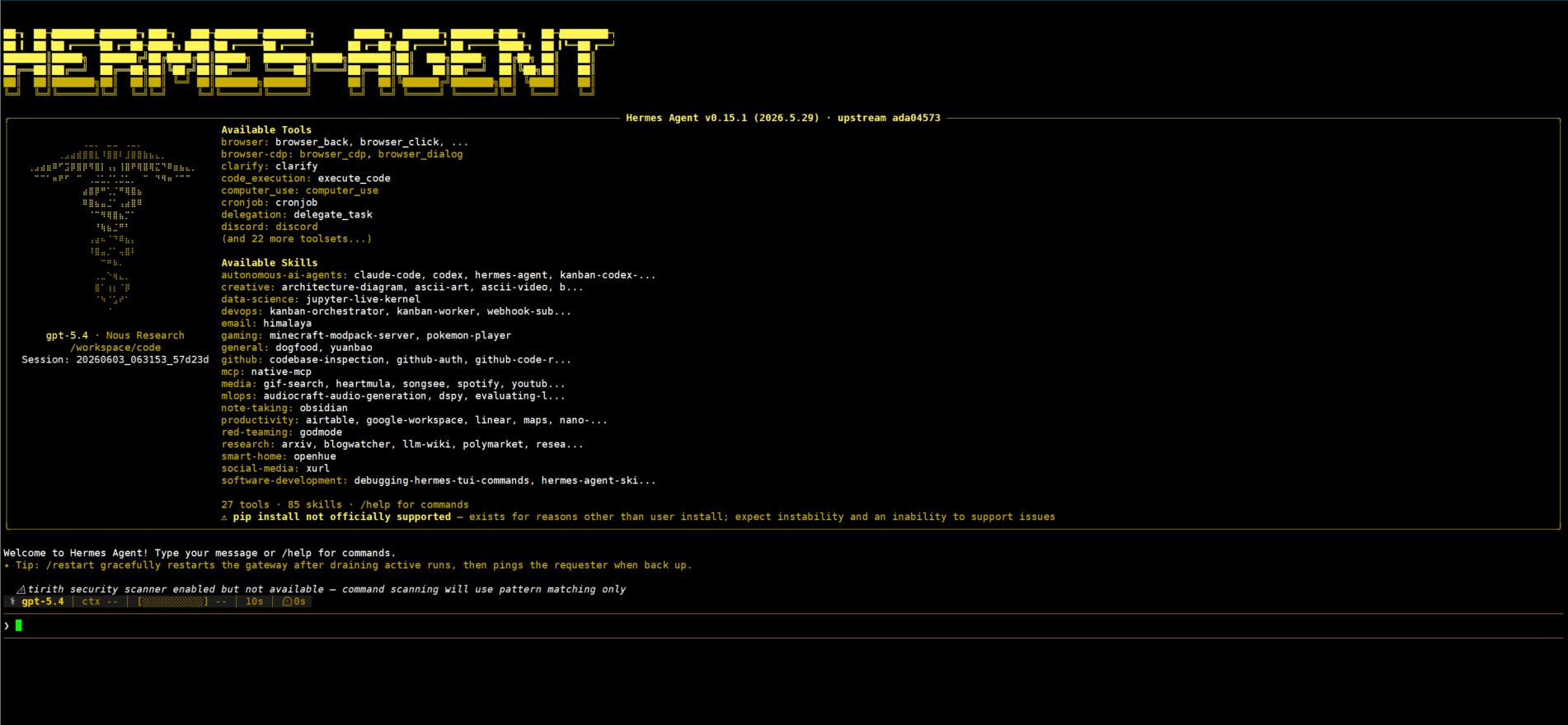
Modern TUI interface (recommended):
hermes --tuiThe TUI mode provides a friendlier interface with history, multi-session switching, and more.
Run Initial Setup
On first use, run the setup wizard to configure basic preferences:
hermes setupConnect to Messaging Platforms (optional)
Hermes Agent supports integration with many messaging platforms (Telegram, Discord, Slack, etc.). Refer to the official documentation for setup instructions.
Long-context models supported on TOKENOPEN (examples):
| Model ID | Context | Description | Access Status |
|---|---|---|---|
gpt-5.5 | 1M | GPT-5.5, latest flagship model | Supported |
gpt-5.4 | 1M | GPT-5.4, balanced performance & cost | Supported |
gpt-5.4-mini | 400K | GPT-5.4 Mini, low-latency lightweight model | Supported |
claude-sonnet-4-6 | 200K | Claude Sonnet 4.6, ultra-long context | Supported |
For the full model list and pricing, visit the Model Marketplace.
Common Commands
| Command | Description |
|---|---|
hermes | Launch in classic terminal mode |
hermes --tui | Launch with TUI interface |
hermes setup | Run the initial setup wizard |
hermes model | Switch model and provider |
hermes config set [key] [value] | Set a configuration value |
hermes postinstall | Run post-installation setup |
Last updated on